Document Versions
Policies get revised, contracts amended, laws consolidated. With the document catalog on, the context engine keeps every version of such a document rather than only the latest file. Ordinary search shows one version of each document, the one its type says is in force, and an agent can still read, quote, cite and compare any version you may see.
The catalog is off until your platform operator turns it on for your tenant, or lets your tenant turn it on itself. Documents in the tenant console says where yours stands. Documents reach the catalog through the web workspace in catalog mode: its uploads, and the files it syncs from Google Drive. Document Sync describes the setup.
Document Author: Uni Zhu
The words it uses
| Word | Means |
|---|---|
| Work | One document over time: the travel policy, a data protection law. |
| Variant | A form of a work that is selected on its own, where the sender states it: each language of a policy, or each jurisdiction and language of a law. The web workspace states none, so each of its documents has one variant. |
| Version | One text of a variant. A new text is a new version; a rename, a move or a change to the file's details is not. |
| Source | A file that holds a version: an upload, or a file synced from Google Drive. Several sources can hold one version. |
| Profile | The document's type. It names the document's fields, how its sections are found, how its versions are compared, and which version search shows. |
What search shows
Ordinary search sees one version of each work in each variant: the one its profile's selection policy picks. Three profiles ship with the engine:
| Profile | For | Search shows |
|---|---|---|
generic | Any document no rule assigns otherwise | The version its source holds now, as before the catalog existed: change the file and search moves to the new text. |
law | Laws and regulations, as complete dated texts | The complete text in force today, by its In force from and In force until dates. See Laws. |
company-policy | Your organization's own policies | The newest version whose status is approved, by its approval date. A curator sets the status; see Company policies. |
Your tenant's administrators decide which documents get which profile, and may change a profile or add their own; see Rules.
When two versions qualify equally, such as two laws in force from the same day and issued the same day (or both without an issue date), search shows neither rather than guess, and a review item asks a curator to settle it. Search never puts an older version in the place of a selected one you may not see.
A hit on a document says which version it is: its label (or its id, when it has no label), its variant, the pages the passage falls on, and up to eight of the document's files you may open, each saying whether it holds this version. The context UGENT gathers before it answers carries the same, so an answer can say "page 4 of the 2025 text" rather than name a file.
Asking about versions
You do not call any tool yourself. Ask in plain words, and the agent picks the tools. Questions that work:
- Which version of the travel policy is in force, and why that one?
- What did article 12 of the data protection law say before this year's amendment?
- Compare the 2024 and 2025 travel policies. Flag every changed amount.
- Quote the overtime section from the version we had in March.
Four tools carry these questions. The engine lists them only while documents are on for your tenant:
| Tool | What the agent gets |
|---|---|
document_fields | The profiles a workspace's documents follow: their fields, the values each field takes, and their selection policies. |
document_versions | Documents found by key, by a file's path, or by field filters; or one document's versions, with which is selected now and, on request, why. |
document_read | The exact text of one version, selected or not: the whole text, one section by its heading, a run of pages, or from a byte offset. Every paragraph is marked for citation. |
document_compare | What changed between two versions of one document, every change with the exact text before and after. See Comparing. |
A read returns at most 50,000 bytes and says where to go on, so the agent reads a long law in parts. A filter names a field exactly as document_fields lists it; a field the profiles do not register is an error, never an empty result.
Citations to an exact version
Every paragraph document_read returns carries a pinned citation id, [[cite:doc:<extraction>:<start>-<end>]], and so does each before and after span of a comparison. A pin names one exact text, and resolves to it for anyone who may open that version, unless the version is purged: after the document changes, after a newer version replaces it in search, after its file is renamed. Nothing is stored per citation; the pin is the whole citation.
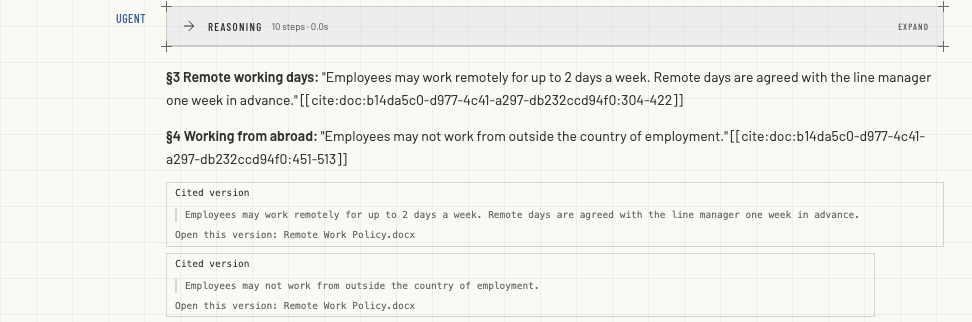
In the web workspace, a cited version shows under the answer as a chip:
- Cited version: label. The version it came from, with the cited text at its page. Without a label it reads Cited version.
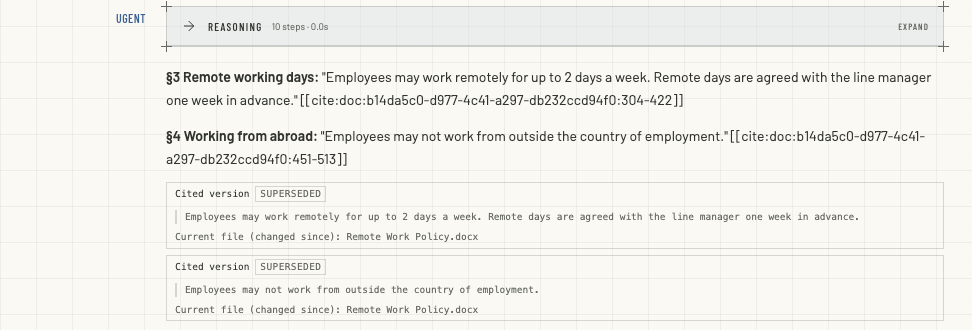
- Superseded. It is not the version search shows now. The chip still shows the text that was cited.
- Open this version: file. A file that still holds this version. Current file (changed since): file when the only file left holds a newer text.
- This version was purged; its text is gone. An administrator removed its text; its title and history remain.
- Source unavailable. The citation does not resolve for you, whatever the reason, including a version you are not allowed to open.
The same answer after a changed copy of the policy was uploaded: its chips now read Superseded and point at the file that holds the newer text, while still showing the words that were quoted.
The answer cites each passage where it uses it: a bracketed number after the sentence, [1], which jumps to the chip with the same number. The chips are listed in the order the answer first cites them, and the numbers appear once the answer is finished.
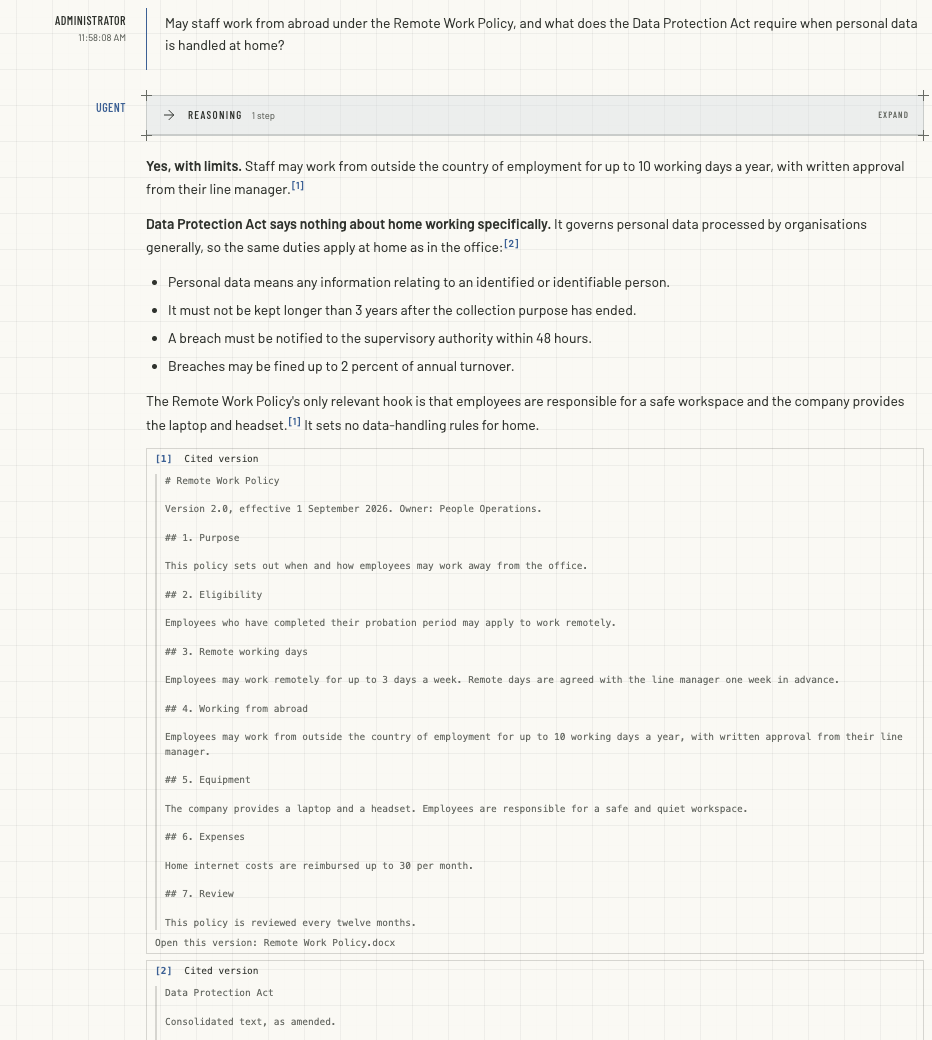
The agent cites this way unprompted where the workspace's AGENTS.md has the section "Citing a passage by its marker"; see Document Sync. Without it, agents tend to cite with footnotes, which show no chip. A marker for a source the agent was not given shows no chip (see Citations under an answer for the warning it can show), and a file it opened by its path rather than through retrieval is cited with a footnote.
A pin the agent wrote without a tool result behind it is dropped as invented. For document citations to reach an answer at all, the operator marks the context engine's MCP service as an evidence source; see Document Sync.
Comparing two versions
A comparison is computed, not judged by a model: the same two versions, compared under the same revision of their profile, always give the same changes, byte for byte. It follows the document's structure. Each section is matched with its counterpart in the other version (by its own id, then, for a law, by article number and heading, then by similarity), and the matched sections are compared word by word. Each Chinese character counts as a word of its own, so Chinese text compares character by character.
| Change | Means |
|---|---|
added, removed | A section only one of the versions has. |
replaced | A matched section whose text changed. |
moved | The same section in another place. |
renumbered | The same section under another number. |
split, merged | One section became two neighbours, or two became one. |
Two flags mark the changes most worth a second look:
- A number changed (
numeric_changed), in digits or in Chinese numerals: an amount, a deadline, a percentage. - A negation changed (
negation_changed): shall to shall not, 应当 to 不得.
An edit that only moves line breaks is left unflagged where the document's type says so, or when you ask the agent to ignore line wraps.
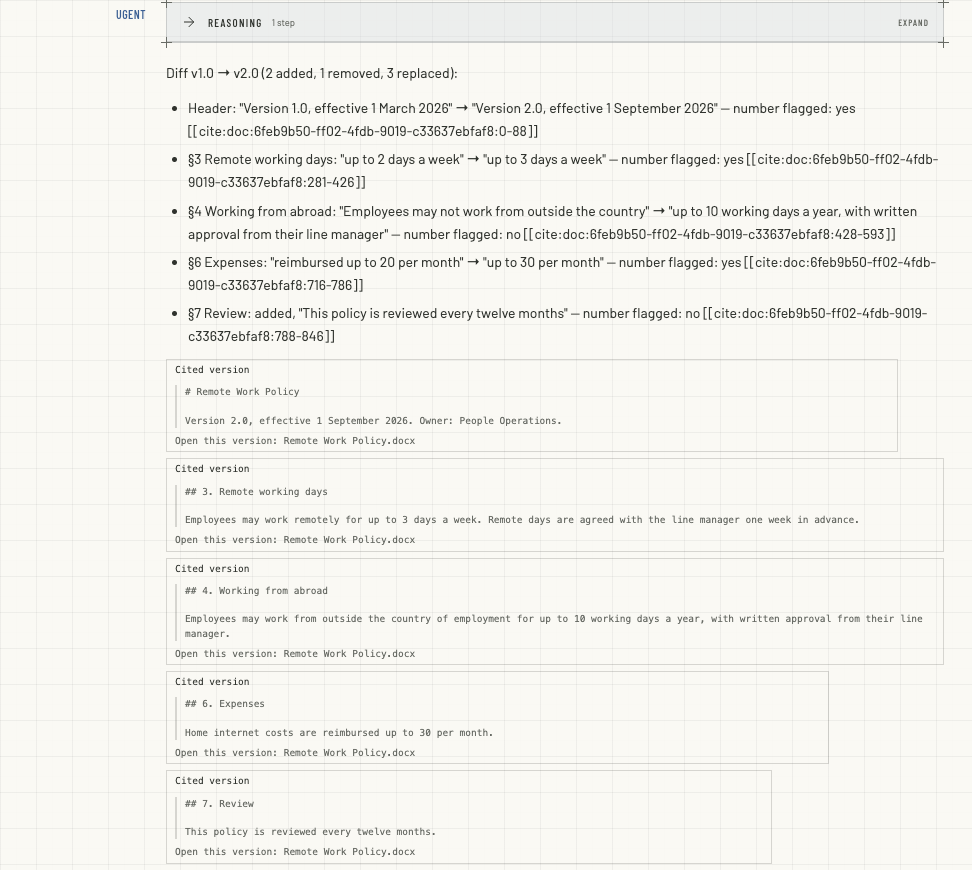
Above, the agent compared two versions of a policy. Three changes carry the number flag: the version line, the remote days and the expense limit. The rewritten section on working abroad changed too much to be matched, so it reads as one removal and one addition, without a flag (see Known limits).
What a comparison will not do:
- Cross documents or variants. Two versions of the same work and variant compare; a policy and a law, or the English and French texts, do not.
- Show you what you may not open. You must be able to open both versions.
- Answer in part. Each side may hold up to 4 million characters by default, and a comparison too large to compute in full is refused rather than answered halfway.
- Exceed one answer. One answer holds up to 50,000 bytes. A change too long for it is listed by its citation pins, for the agent to read with
document_read, and changes beyond that are counted.
Laws: the text in force
The law profile is for complete, dated texts: an original text or a consolidated one. An amending act is a work of its own. Each jurisdiction and language is its own variant where the sender states them, so an official translation is selected on its own. The web workspace states none. There, a new text is a new version of a law only when it replaces the file under the same name in the same folder, or when a curator links it; a text uploaded under another name is a document of its own, selected on its own.
Chapters, sections and articles are found by their numbers: 第…章, 第…节 and 第…条 in Chinese or Arabic numerals, and Chapter N, Section N, Article N and § N. A comparison therefore matches articles by number and heading.
Search shows the text in force now: a complete text whose In force from date has passed and whose In force until date, if it has one, has not.
- The dates come from a curator. The law profile takes them only from a curator or from a sender's manifest, never from the text, and the web workspace's manifest carries none. A curator sets them in the tenant console when the version is part of a review item (a tie, or two copies that arrived out of order), and otherwise through the engine's
POST /v1/document-versions/{id}/assertions; see Curating. - Uncurated means unverified. Until any version of a law carries an In force from date, versions without one stay eligible and the selection is marked unverified. Once one version carries it, versions without it no longer qualify. Such a version raises no review item, so date it through the assertions route.
- Dated changes switch by themselves. When a new text comes into force, the engine notices within about a minute by default, plus the time it takes to update search. The upcoming text is embedded up to an hour ahead where there is room, so the switch is quick, but it is eventual: not at the stroke of midnight.
Company policies: the newest approved
The company-policy profile selects the newest version whose Status is approved, by its Approved on date. Each language is its own variant, where the sender states it. A draft, or a version in review, stays readable and citable but out of search. The approval date can come from a curator, from the sender's manifest, or from the uploader's own metadata, in that order of preference.
Nothing in the web workspace approves a policy
A version without a Status is not eligible, and neither the web workspace nor Google Drive states one. A policy uploaded there stays out of search, and raises no review item, until a curator sets its Status and Approved on through the engine's POST /v1/document-versions/{id}/assertions.
Who sees which version
Who may open a version is decided from the files that hold it. Nothing about the version itself grants access:
- You may open a version when your access rules reach the current path of a file that holds it, or once held it, provided that file has not been deleted or held back by an administrator. Your clearance must reach the most sensitive level among those files, raised by any marker in the text itself.
- A version no such file is left for, because every file holding it was deleted or held back, is revoked: only administrators may open it, or nobody, as your tenant chooses.
- Lists never mention a version you may not open. Where a selection involves versions you may not see, you are told only that no version you may open is selected.
Moving, renaming and deleting
What happens through the web workspace:
- Renaming or moving a document or a folder keeps each document the same source at a new path. Its versions and citations follow it.
- Changing a document records a new version: upload a changed copy under the same name into the same folder, or change it in Google Drive. Search moves to it where the profile says so: under
genericit does, as before the catalog. A copy under another name, or in another folder, is a document of its own. - Deleting a document takes it out of search. Its versions stay in the catalog; while no file holds them they are revoked.
- Purging is an administrator's action on one version. It removes the version's text, page map, figures and comparisons. Its title, its files' paths, its metadata and its history stay.
Known limits
- One passage per long document. A search returns one region of a long document, as for any long file. The agent reads the rest with
document_read. - Briefly twice. While search switches to a new version, the old and the new text can both appear for a short time.
- A rewritten section reads as removed and added. A section whose text changed beyond the similarity threshold is reported as one removal and one addition, not as one replacement, and carries no flags. Outside laws, sections are matched by similarity alone, so this holds even under an unchanged heading. In a law, articles are also matched by number and heading, so it holds only for an article without a heading of its own.
- Flags read the words, not the meaning. A negation changed is raised when negation words change. Two clauses whose negations swap places with no negation word edited are reported as a change without the flag.
- Paragraph pins. A citation pin covers a run of lines without a blank line, so a code block or a table with blank lines inside it is several pins.