File Confinement
In a workspace that holds a folder per department or per person, file confinement decides which folders each person may reach: what Files shows them, which record cards they see, and what the agent's file tools may open when it works for them. What search returns is decided separately, by the context engine's access rules.
Document Author: Uni Zhu
Who reaches what
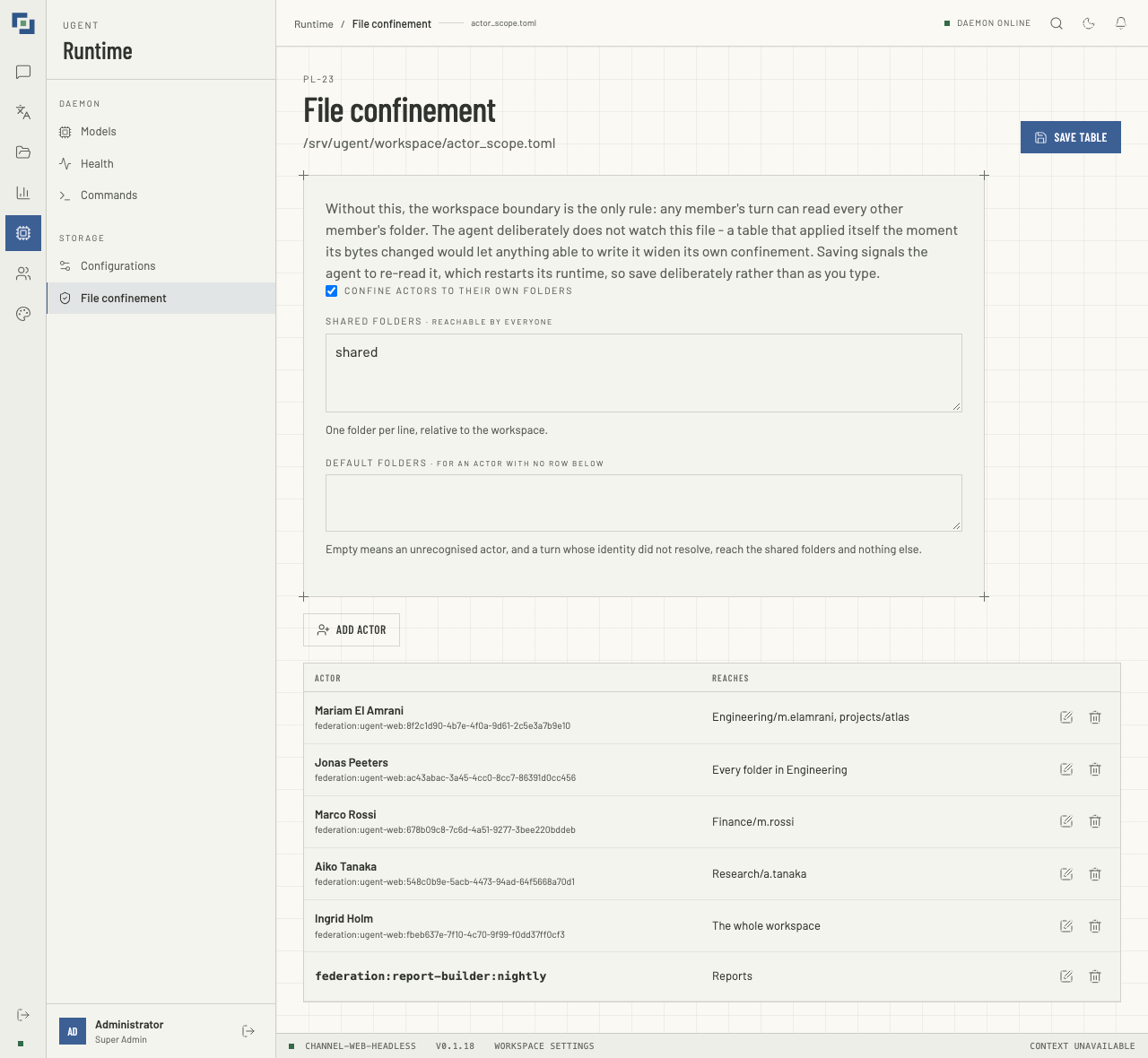
The table gives each person one row, named by the person the user directory holds, however old the account; a row whose id the directory does not know, or could not be asked about, shows the id. With the department layout, a row reaches:
- their own folder,
<Department>/<folder name>; - their department's shared folder,
<Department>/Shared; - all of
<Department>, for a department supervisor; - the whole workspace, for an administrator;
- any extra folders the row lists.
Everyone, listed or not, also reaches the table's shared folders, and a person with no row reaches those and the default folders only.
A person with no row reaches only the shared and default folders. That is the usual reason one person sees 1 cited record can't be shown. under an answer that someone else sees as a card: the record's CSV is in a department folder their row does not reach, or they have no row at all.
Choosing a department under People adds no row here. A person's department and groups in the user directory decide which models they may use and what search returns to them. Their folders are set here, so add everyone who works in a department's folders, and change their row when they move. Until then, search can find a file for them that Files will not open.
Add a person
Open Runtime → File confinement. Changing the table needs files:manage. Nothing on the page can be changed until the table has loaded; if it does not load, Nothing can be saved: the confinement table did not load. stands beside Save table.
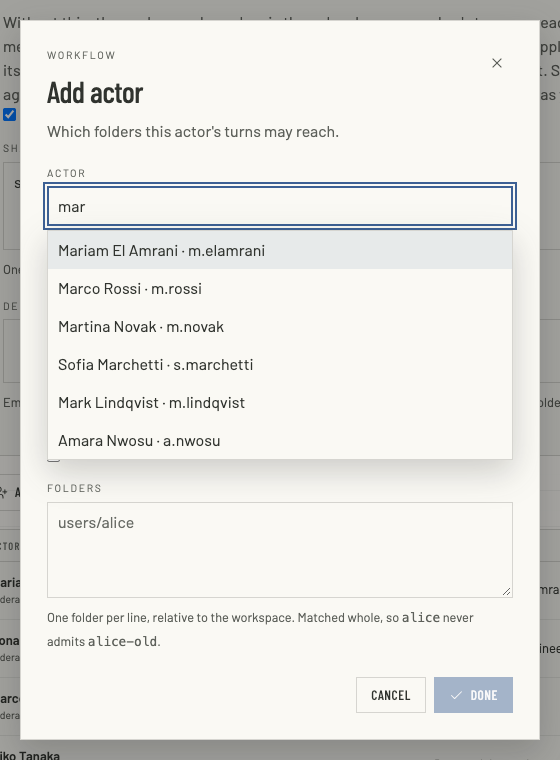
- Click Add actor.
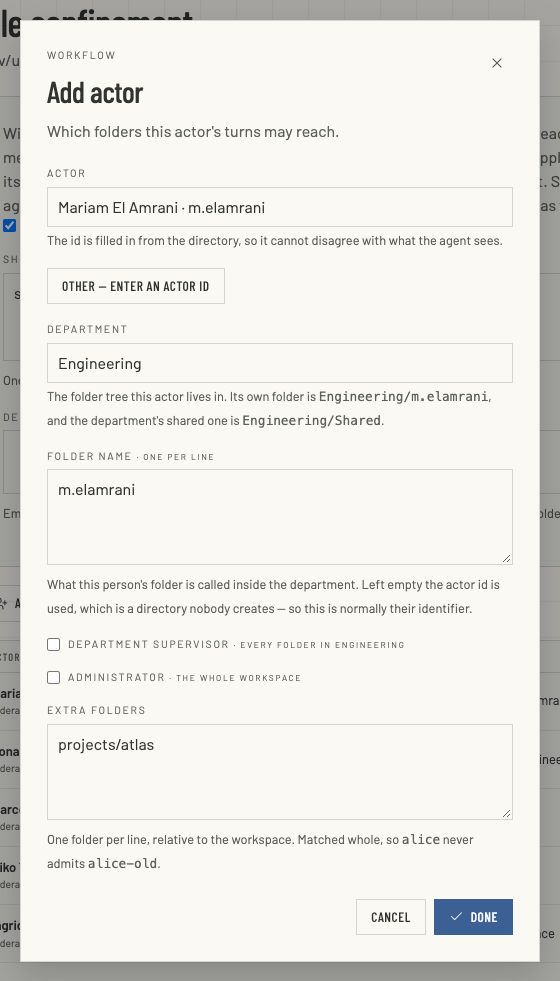
- Actor: type part of the person's name, identifier or email, then pick them from the matches, with the mouse or with the arrow keys and Enter. The list shows the first 20 matches and says when there are more, so keep typing to narrow them down. The actor id is filled in from the directory, so it cannot disagree with what the agent sees. Other — enter an actor id is for an actor that is not a web user, such as a federated service; type its id exactly as the identity resolver emits it. If you cannot read the user directory, the field asks for the id.
- Department: the department's folder, spelled as it is on disk:
Financeis notfinance. - Folder name: the person's own folder inside the department, normally their identifier, one per line. Left empty, the actor id is used, which is a folder nobody creates.
- Tick Department supervisor for someone who reaches the whole department, or Administrator for the whole workspace. Leave both clear for everyone else.
- Extra folders: any other folders this person may reach, one per line, relative to the workspace, such as
projects/atlas. A folder is matched whole, soalicenever admitsalice-old. - Click Done, then Save table.
Each list on the page, the shared and default folders included, keeps what you type: Enter starts the next folder, and a space inside a name stays. What is saved trims each line and drops the blank ones.
The page then says Confinement table saved and applied to the running agent. Files and record cards use the new table straight away. If the page says instead that the running agent could not be signalled, the agent keeps the previous table until it is reloaded (SIGHUP) or restarted.
Set it up once
This is for whoever runs the agent. The table lives in a file of its own, which the agent's ugent.toml names:
[security.actor_scope]
file = "actor_scope.toml"- A relative path resolves against the workspace root. An absolute path outside the workspace is the hardened form: nobody working in the department can write it.
- A file that is named but cannot be read stops ugent at start, rather than letting it run with no confinement. So does a
ugent.tomlthat names a file and also sets the table inline. - In the file, the table's keys sit at the top level, with no
[security.actor_scope]header; see A file the agent refuses. - The web workspace reads the same file, by the agent's rules, so what Files shows and what the agent may open agree, unless the agent has fallen back to a
ugent.tomlthe web workspace does not read; see When the workspace is locked.
File confinement writes the file. For reference, a table with one person looks like this:
# actor_scope.toml
enabled = true
shared = ["shared"]
default_roots = []
layout = "group_actor"
group_shared_folder = "Shared"

[[actors]]
id = "federation:ugent-web:8f2c1d90-4b7e-4f0a-9d61-2c5e3a7b9e10"
group = "Engineering"
aliases = ["m.elamrani"]
roots = ["projects/atlas"]| Key | What it does |
|---|---|
enabled | Confines each person to the folders below. A file must set it, true or false. |
shared | Folders everyone reaches. |
default_roots | Folders a person with no row reaches. Empty means the shared folders only. |
layout | group_actor derives a row's folders from its department; none, the default, uses only roots. |
group_shared_folder | The department folder its members share. Shared by default; spell it as the folder on disk is spelled. |
id | The actor id, as the identity resolver produces it. |
group | The person's department, under group_actor. |
aliases | The name of the person's own folder in the department. |
roots | Extra folders. Without a layout, every folder the person reaches. |
group_supervisor | Reaches the whole department. |
supervisor | Reaches the whole workspace. |
Spell folder names as they are on disk. The context engine compares a department's shared folder without regard to case, and a filesystem does not. A table that says Shared over a folder called shared leaves search returning documents that Files and the agent then refuse to open.
A file the agent refuses
A file the agent would read other than as it was meant is refused, with the reason, naming the file:
- one wrapped in a
[security]or[security.actor_scope]header, whose keys would all go unread; - one with a key the table does not have, such as
enableforenabled; - one with a key of the wrong type, such as
enabled = "yes", oractorsthat are not a list of tables; - one that sets
fileitself; - one that does not set
enabled, which would switch confinement off without saying so.
The agent will not start on such a file. A reload (SIGHUP) that finds one keeps the table the agent already enforces.
The web workspace refuses the same files, and what it then does depends on whether it has read a good table from that file since it started:
- It has: that table stays in force for Files, record cards and the page, until the file is fixed.
- It has not, as after a restart: it fails closed. Whoever the file would confine reaches no folder at all, the shared and default folders included, and only the administrators the file names (
supervisor = true) keep the run of the workspace, so that one of them can open File confinement and fix it. A cloud import fetches nothing meanwhile and says the table is refused, for anyone but an administrator the file names with a folder of their own, whose imports and syncs go into it as before. A file that does not parse, whoseactorsdo not read, or that names no administrator leaves nobody to trust: the workspace is then locked, and nobody can open File confinement either, until the file is fixed on disk.
The web server's log says why it refuses a file, in one line.
When the workspace is locked
A file that cannot be read never loosens confinement. The web server counts each of these as a failure:
ugent.tomlcannot be read, does not parse, or sits where the web server may not look, such as a folder it may not search. Only a missing file, or a missing folder on the way, is none;ugent.tomlhas gone since the web server last read it;- its
securityis no table, or its[security.actor_scope]section is no table or holds a key of the wrong type, such asenabled = "yes". The agent will not start on it either. Unlike a refused file, it never fails closed to the administrators it names: the web server keeps the table last served, or locks. An unknown key, or noenabled, is refused only in a pointed-to file; - its
[security.actor_scope]section names afileand also sets the table inline:enabled = true, ashared,default_rootsoractorsthat is not empty, or alayoutother thannone. The agent will not start on it either, since two sources for one policy are ambiguous; the web server keeps the table last served, or locks, as for a key of the wrong type.enabled = false, empty lists,layout = "none"and agroup_shared_folderset nothing, so besidefilethe file is read; - the file it points at is missing (a name mistyped when repointing it, say) or is not the web server's to read. A blank
file,""or only spaces, is such a pointer:""names the workspace's own folder, and spaces a file that is not there. The agent will not start on it either.
The web server then goes on serving the last table it served, if that was read through the same ugent.toml, and says so in its log. With no such table, as on its first request after a restart, it locks the workspace. A refused file with no good table read from it locks it too, if it leaves nobody to trust, as above.
Nobody is unconfined in a locked workspace, an administrator included. Files, File confinement and Configurations, its Record types check among them, tell everyone The workspace is locked: its confinement table cannot be read as it is, so nobody reaches its folders or its configuration until it can. The server log says why. Each asks for its own permission first. Record cards and the source of a citation reach no folder. A cloud import has no folder of its own to write to: a file picked is not imported, and one changed in Google Drive is left as it was until the table can be read again, neither refused nor fetched. A Disconnect, and a file removed in Google Drive, still remove their copies.
If a name is mistyped after the web server has served the table, the workspace is not locked: the web server goes on serving that table, and File confinement says cannot be read. The lock shows when the web server is restarted on the mistyped name.
To lift a lock, make the file readable and right, or correct the name, as the log says. The next request reads it, with no restart.
Taking the ugent.toml away is no way out. The lock holds, unless another ugent.toml is then found in its place: the one in the workspace's .ugent folder, once the one at the workspace's root is gone. It is read like any, and serves what it says, confinement off included. An agent restarted without its ugent.toml starts on another one it finds, such as that one or the one in its home folder, which the web workspace never reads, or writes a default one; a default confines nobody.
A workspace is unconfined only where the table in force says confinement is off, or where no ugent.toml has been found since the web server started. One the web server may not look at is found, and fails. No confinement configured is no failure.
Saving over a refused or new file
File confinement shows a refused file as refused, with the agent's reason, and says that the table below is what the file meant, not the file: saving replaces the file with it. Saving keeps the layout the file has, or sets it to none if the file could not be read: the page has no control for the layout.
A file that cannot be read at all, because it is missing or the web server may not read it, shows as cannot be read, with the agent's reason and what the file manager serves meanwhile: the table it served last, and after a restart nothing to anyone. A file nobody has written shows cannot be read and new file both; one in a folder the web server may not search shows cannot be read alone. In either case the table shown is not the file, and saving writes it in the file's place, with no layout. A blank file is the exception: it shows cannot be read alone, never new file, and saving is refused with This workspace's ugent.toml names a blank file in its [security.actor_scope], which the agent will not start on. Name the file there first. Nothing is written, neither at the workspace's own folder nor at a file named with spaces. The page opens only to whoever the table in force leaves unconfined, so in a locked workspace nobody reaches it.
The page never saves whether confinement is on from a default. Where the table shown is not the file, or the file does not exist yet (new file: saving creates it), it asks Confinement, On or Off, with nothing chosen, and Save table waits for the choice. Creating the file is not neutral: the agent will not start while it is missing, and enforces what it says once it exists.
From the tenant console
The tenant console's Directory has a collapsed card, Agent file confinement (ugent.toml), which writes a whole table from the engine's directory, for a first setup. It cannot save it: copy the text into the file. It also rebuilds every row:
- A person in more than one group gets no department, only a folder named after their id, so they would not reach their department's shared folder.
- Extra folders set on this page are not in it.
So to add or change one person, use File confinement here.
When something looks wrong
- One person sees 1 cited record can't be shown. and another sees the card. The first has no row, or their row does not reach the folder that holds the record's CSV.
- Search finds a file the person cannot open. Search follows the user directory's groups; files follow this table. Give them a row, or an extra folder.
- The page says the running agent could not be signalled. The agent still enforces the previous table. Reload ugent (
SIGHUP) or restart it. - ugent will not start. The file
ugent.tomlpoints at is refused, missing or unreadable, orugent.tomlnames a blankfileor also sets the table inline, or theugent.tomlitself, in the workspace or named by--config, cannot be read or does not parse, or itssecurityis no table, or its[security.actor_scope]section is no table or holds a key of the wrong type. The log names the file and why; see A file the agent refuses. - Files shows nothing to anyone but an administrator. The file is refused, and the web server has read no good table from it since it started, so it fails closed. An administrator the file names can open File confinement, which says why, and save the table.
- Files shows no folders to anyone, and says The workspace is locked. File confinement and Configurations say the same, to an administrator too. The web server cannot read the confinement table and has none to go on serving. Its log says why, in one line: a
ugent.tomlthat cannot be read, does not parse or sits where the web server may not look, asecurityor[security.actor_scope]that is no table or holds a key of the wrong type, afilenamed beside a table set inline, a blankfile, a file it points at that is missing (a mistyped name, say) or not the web server's to read, or a refused file that leaves nobody to trust. Fix the file or the name, or let the web server look at it; the next request reads it, with no restart. Taking theugent.tomlaway does not lift the lock; see When the workspace is locked. - Save table stays off. The table did not load, or the page asks for Confinement, On or Off, first.
- Nobody is confined. Confine actors to their own folders is off.