Record Cards
When an answer rests on rows of a spreadsheet — an audit register, a log of review findings, a product list — the web workspace can show each row it cites as a card under the answer, read from the file itself. The agent only names the row; the page fetches it. Nothing on a card comes from the model's text, so a reader sees the row as it is in the file now, not as the model remembered it.
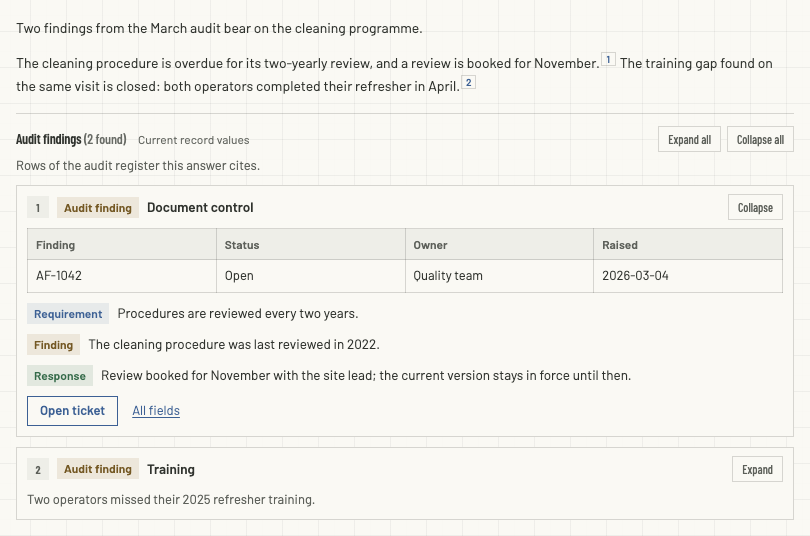
This page is for whoever looks after the workspace's AGENTS.md. Readers need nothing set up: cards appear by themselves once a workspace has them — see what readers see.
How it works
AGENTS.mdlists the record types. A fenced block whose info string isrecord-typesholds JSON describing each kind of record: the CSV it lives in, the column that is its key, and how its card is laid out. The agent reads the same file, so the rule that tells it how to cite and the list of what it may cite cannot drift apart.The agent cites a row as a footnote whose whole text is a record reference — the type, the row's key, and the opening words of one of its columns:
markdownThe cleaning procedure is overdue for review.[^1] [^1]: record:audit-finding/AF-1042 "The cleaning procedure was last reviewed in 2022."The page asks the server for the row. The server checks that the reader may open the file, finds the row by its key, and checks that the quoted words open the row's confirm column — and no neighbouring row's. Only then does it build the card, from the row's current values.
Anything that fails shows no card. A wrong key, a quote that does not match, or a file the reader may not open never shows a different row; the answer says how many of its records can't be shown, and nothing about why.
The quote check is what catches a citation with the wrong key: an off-by-one key quotes its neighbour's words, which do not open the row it names.
Before you start
- A CSV or TSV file in the workspace's files, with a header row and a column whose values identify each row (a ticket number, a finding id). The file must be in a folder the readers may reach — read access to a record is read access to its file — and at most 20 MB.
- Permissions.
AGENTS.mdis edited in Runtime → Configurations, which needsfiles:manageto save (files:readto view) and an account that is not confined to one department; while the workspace is locked, no account opens Configurations. Files refuses to openAGENTS.md, on purpose. Readers needfiles:readand access to the CSV's folder; see File Confinement. - Where it lives.
AGENTS.mdsits at the root of the workspace's files — the folder Files calls Shared files. It is the agent's instructions file too, so keep what is already in it.
Set it up
The steps below use a made-up register; replace its names with your own.
1. Put the file in place
Upload audit-findings.csv into a folder such as Registers/:
finding_id,area,requirement,finding,response,status,owner,raised_on,ticket_url
AF-1042,Document control,Procedures are reviewed every two years.,The cleaning procedure was last reviewed in 2022.,Review booked for November with the site lead.,Open,Quality team,2026-03-04,https://tickets.example.com/browse/QA-311
AF-1043,Training,Operators complete refresher training every year.,Two operators missed their 2025 refresher training.,Both completed the course in April.,Closed,Operations,2026-03-04,https://tickets.example.com/browse/QA-3122. Describe it in AGENTS.md
Add a record-types block. This one declares one type, audit-finding:
```record-types
{
"section": {
"title": "Audit findings",
"intro": "Rows of the audit register this answer cites.",
"expandFirst": 1
},
"allowedHosts": ["tickets.example.com"],
"types": [
{
"id": "audit-finding",
"description": "One finding from the internal audit register.",
"source": {
"kind": "csv",
"path": "Registers/audit-findings.csv",
"key": "finding_id",
"confirm": "finding"
},
"badge": { "text": "Audit finding", "tone": "warning" },
"title": { "column": "area" },
"summary": { "column": "finding" },
"tables": [[
{ "label": "Finding", "column": "finding_id" },
{ "label": "Status", "column": "status" },
{ "label": "Owner", "column": "owner" },
{ "label": "Raised", "column": "raised_on" }
]],
"blocks": [
{ "label": "Requirement", "column": "requirement", "tone": "info" },
{ "label": "Finding", "column": "finding", "tone": "warning", "clampLines": 4 },
{ "label": "Response", "column": "response", "tone": "success" }
],
"actions": [
{ "label": "Open ticket", "link": { "column": "ticket_url" }, "style": "button" },
{ "label": "All fields", "detail": true }
],
"detail": [
{ "label": "Finding ID", "column": "finding_id" },
{ "label": "Requirement", "column": "requirement" },
{ "label": "Finding", "column": "finding" },
{ "label": "Response", "column": "response" },
{ "label": "Raised on", "column": "raised_on" }
]
}
]
}
```Read it top to bottom as the card it makes: a numbered head with the badge and the row's area as its title, then a one-row table, three coloured blocks, a button that opens the row's ticket, and All fields, which opens the detail list in a dialog. A closed card shows only its head and the summary.
3. Tell the agent how to cite
Next to the block, add a section in your own words that tells the agent how to cite a row. This is the template to start from:
## Citing a record
Some answers rest on rows of the CSV files listed in this file's
`record-types` block. Cite each row you rely on as a footnote whose whole
text is a record reference, and never paste the row's content into the
answer: the page shows the row itself, as a card, read from the file.
The cleaning procedure is overdue for review.[^1]

[^1]: record:audit-finding/AF-1042 "The cleaning procedure was last reviewed in 2022."
- `audit-finding` is the type's `id`; `AF-1042` is the row's value in the
type's `key` column, exactly as retrieved.
- The quoted text is the opening of the row's `confirm` column, copied
verbatim in its own language, never translated or summarised: the whole
first sentence, and at least the type's `confirmMinChars` characters.
- One footnote per row; reuse its label when citing the row again.
- Cite only rows you read this turn. A row whose text you cannot quote, do
not cite.The example citation is indented, not fenced, on purpose: a record: footnote inside a fence in AGENTS.md is only an example.
4. Check it before you save
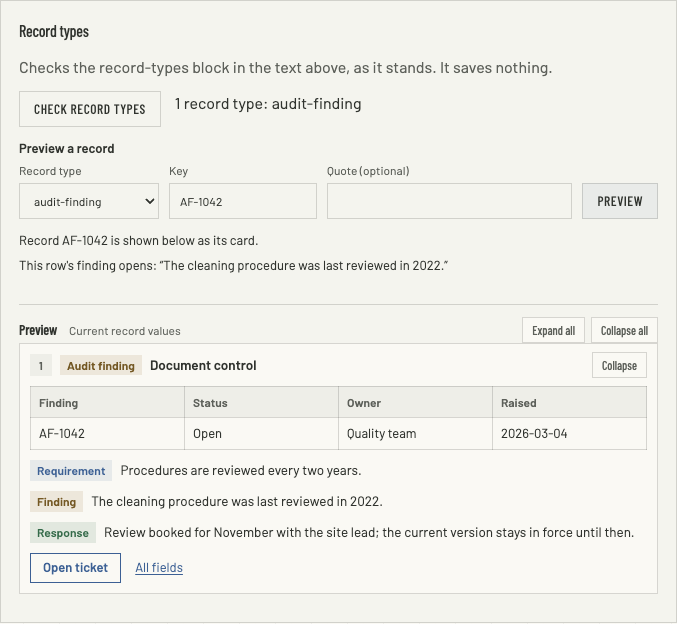
Under the AGENTS.md editor in Runtime → Configurations is the Record types panel. It works on the text in the editor as it stands, saved or not, and saves nothing:
- Check record types lists the types the block declares, or every problem in it, each with the JSON path it is about — see what the check refuses.
- Preview a record: choose a type, give a Key, and optionally a Quote. The panel draws the card a reader would get, or says why there is none — No row has the key AF-1044., The quote doesn't open this row's finding., The quote also opens a neighbouring row: quote more of it. For a row it finds, it also shows the first 80 characters of the confirm column, which is what the agent must quote.
It also names columns the block uses that the file does not have, and how many rows repeat a key (the first one is used). When the panel's result is older than your last edit it says so: check again. Then Save file.
Changes take effect without a restart: the server reads AGENTS.md and each CSV again when the file changes, and an open page asks again for an answer's cards after five minutes.
What readers see
Under an answer that cites records, a section headed with the block's title — References unless you name it — with the number found and the note Current record values. The first cards (expandFirst, three unless you say otherwise) are open; the rest show their head and summary until Expanded, and Expand all and Collapse all do every card. A footnote mark in the answer jumps to its card and opens it.
- Blocks with
clampLinesare held to that many lines with Show more. - Links in cells and actions open in a new tab.
- A detail action opens the row's
detailfields in a dialog; Esc, the backdrop or Close puts it away. - Past
maxRecordscards the section ends with and N more not shown. - Records the reader cannot be shown are counted, never described: 2 cited records can't be shown.
A workspace without a valid block shows a record: footnote as the plain footnote it is.
Reference
The block
- One fenced block with the info string
record-types, holding JSON. A second block is refused: the agent reads both, and only one could count. - Inside an HTML comment — from a line that starts with
<!--to its-->— the block is ignored, which is a way to switch cards off without deleting it. A block shown inside a longer fence — four backticks, as on this page — is an example, not a block. - All or nothing. One problem anywhere and no record type is in force, so a typo never shows half a card. The check reports up to 50 problems at a time.
- Unknown properties are refused everywhere, so a misspelt key is an error, not a silent default.
Top level
| Key | What it holds |
|---|---|
types | Required. A list of at least one record type. |
section | How the cards' section looks. Optional; see below. |
allowedHosts | Hostnames links may point to, like tickets.example.com. Without it, any http or https link is allowed. |
section
| Key | Default | Allowed |
|---|---|---|
title | References | Text. |
intro | Records this answer cites. | Text, shown under the heading. |
showCount | true | true or false: the number found beside the title. |
expandFirst | 3 | 0 to 30: how many cards start open. |
maxRecords | 10 | 1 to 30: the most cards one answer shows. |
A record type
| Key | What it holds |
|---|---|
id | Required. 1 to 40 lowercase letters, digits or hyphens. The audit-finding in record:audit-finding/AF-1042. Each type's id must be different. |
description | Text for whoever reads the block. Not shown. |
source | Required. Where rows come from; see below. |
badge | { "text", "tone" }: a coloured label in the card's head. |
title | { "column" }: the column shown as the card's title. |
summary | { "column", "maxChars" }: what a closed card shows. maxChars is 20 to 2000, 160 by default. |
tables | A list of table rows, each a list of cells: each row becomes a small table with the labels as its header. |
fields | A list of cells, shown as label and value pairs. |
blocks | A list of blocks: a labelled, coloured paragraph each. |
actions | A list of buttons or links under the card. |
detail | A list of { "label", "column" } an action with "detail": true opens in a dialog. |
hideEmpty | true by default: a cell, block or field whose value is empty is left out. |
A type needs at least one of tables, fields or blocks.
source
| Key | Default | What it holds |
|---|---|---|
kind | — | Required. "csv", for CSV and TSV files alike. |
path | — | Required. The file, relative to the workspace's files, with / between folders: Registers/audit-findings.csv. It must end in .csv or .tsv, and may not start with /, climb out with .. or pass through a hidden name. |
key | — | Required. The column whose value a citation names. Values are trimmed; a row with an empty key cannot be cited. |
confirm | — | Required. The column the citation's quote is checked against. The card must show it: in the title, summary, tables, fields or blocks, or in detail that an action opens. |
confirmMinChars | 16 | 8 to 128: how much the quote must hold, counted after the comparison's normalising. |
confirmWindow | 5 | 1 to 20: how many rows either side of the cited one a quote must not also open. |
decode | — | { "literalNewlines": true } for a file that writes line breaks as the two characters \n: they are shown as line breaks and compared as spaces. |
Cells, blocks and actions
| Part | Keys |
|---|---|
Cell (in tables and fields) | label, column, and optionally link. |
| Block | label, column, tone (neutral by default) and optionally clampLines, 1 to 50. |
| Action | label, and exactly one of link or "detail": true; style is link (the default) or button. |
| Link | Exactly one of { "column": "ticket_url" } — a column holding the URL — or { "template": "https://tickets.example.com/browse/{ticket}" }, whose {column} placeholders are filled from the row. |
Tones are neutral, info, success, warning and error.
A link is shown only when it is an http or https URL with no user name or password in it, at most 4,096 characters, to a host in allowedHosts if you gave one. A template whose placeholder is empty in that row, or . or .., makes no link.
What the check refuses
Every problem is reported with the path it is about, as in types[0].source.path: must end in .csv or .tsv. Among them:
- invalid JSON, with its line and column, or a block that is never closed;
- a missing required key, an unknown one, a value of the wrong kind, or a number outside its range;
typesempty, or anidused twice;- a type with none of
tables,fieldsorblocks; - a
confirmcolumn the card does not show; - an action with both a link and detail, or neither, and a detail action on a type with no
detail; - a link with both or neither of
columnandtemplate, or a template that is nothttp(s)or has an unclosed, empty or nested placeholder; - a source path that is absolute, climbs out, is hidden or is not a CSV or TSV;
- a second
record-typesblock.
How a quote is compared
The quote and the confirm column are compared after both are normalised alike: Markdown backslash escapes removed, full-width letters and digits made ordinary (Unicode NFKC), curly, low and corner quote marks read as straight ones, runs of whitespace made one space, letters lowercased, and a trailing ellipsis dropped. The quote must open the column — the start of it, not a phrase from the middle — and hold at least confirmMinChars characters, up to 512. If it also opens a row within confirmWindow rows either side, no card is shown: rows that begin with the same words need a longer quote.
Limits
| What | Limit |
|---|---|
| References one answer can show cards for | 30, and maxRecords cards of them |
| A key | 200 characters |
| A quote | 512 characters |
| A value on a card | 20,000 characters, then cut with a note saying so |
| A CSV file | 20 MB |
| Previews in the panel | 30 a minute per person |
When something looks wrong
- Citations show as raw
record:footnotes. The workspace has no valid block: open the panel and Check record types. The server may also have been unable to readAGENTS.mdjust then. - "N cited records can't be shown." For each, preview the type, key and quote in the panel: the key may not exist, the quote may not open that row or may also open a neighbour, or — for a reader rather than you — the file may be outside their folders. While the workspace is locked, every file is, and the panel is closed to you too.
- A field is missing from a card. Its value is empty and
hideEmptyis on, or the column is not in the file (the panel lists those). - A link is not there. It is not
http(s), carries a password, points outsideallowedHosts, or its template had an empty placeholder. - Two rows share a key. The first one is used; the panel says how many repeat.